Rowmind MCP Server & Dashboard
⚠️ CLONE REQUIRED FOR TESTING
This is a single-user, private-instance project. The public demo is limited because exposing CSV files would let anyone delete or corrupt data.
To test properly: Clone the repo → Run locally or as a private Space → Connect your MCP client.
This design ensures your data stays yours.
What is this?
Rowmind is a small "memory layer" for your AI chat client. You talk to Claude, ChatGPT, Cursor... and they can save stuff for you. Tasks, expenses, random notes, whatever you want.
The twist? Everything is stored in plain CSV files. No fancy database. No cloud sync. Just files you can open with Excel or any text editor.
Why CSV?
- You own your data — it's right there, on your disk
- Easy to backup — just copy the folder
- Easy to debug — open the file and see what's inside
- Works offline — no internet needed for storage
- Hackable — add columns, edit rows, do whatever
How it works
┌─────────────────┐          ┌─────────────────┐          ┌─────────────────┐
│   Your Chat     │   MCP    │    Rowmind      │  R/W     │   CSV Files     │
│   Client        │ <------> │    Server       │ <------> │   (your data)   │
│ (Claude, etc)   │ Protocol │   (this app)    │          │                 │
└─────────────────┘          └─────────────────┘          └─────────────────┘
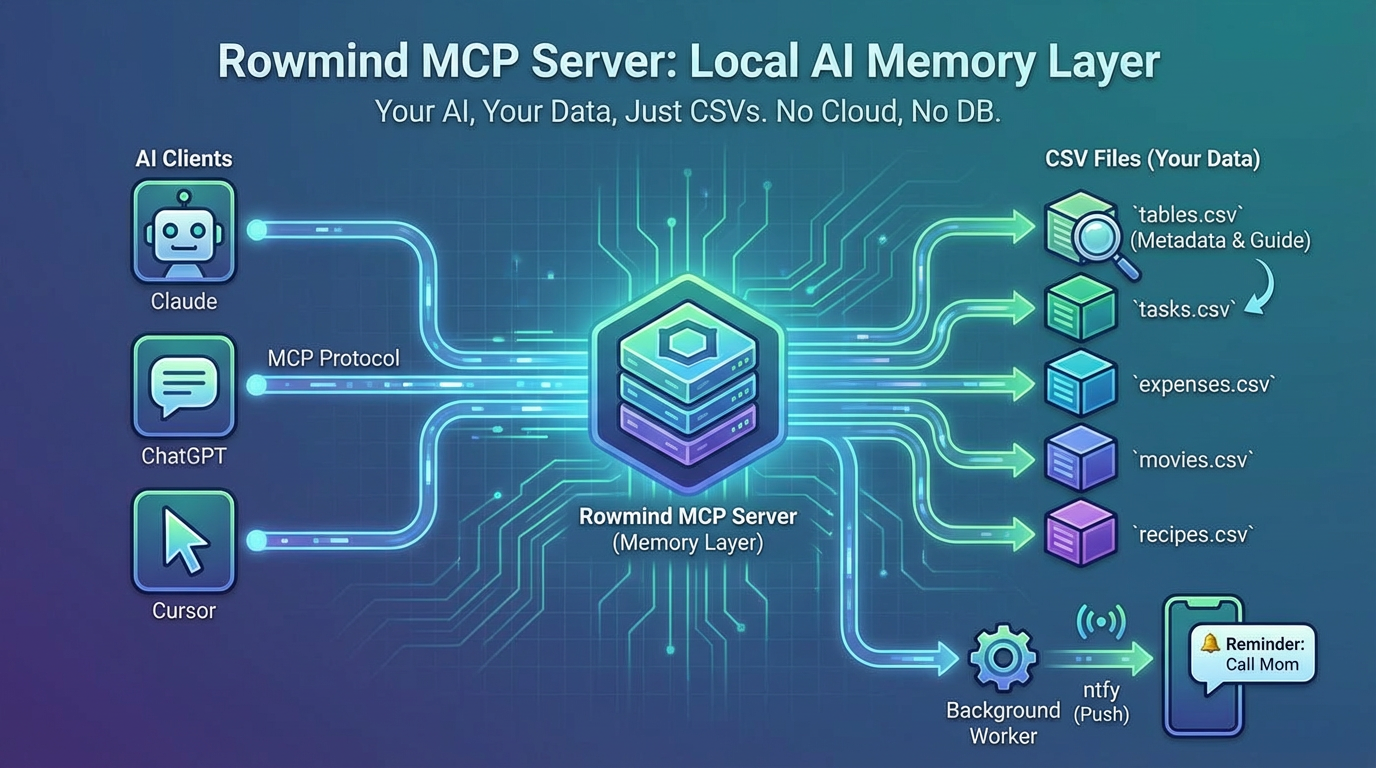
[TODO: Add nicer diagram image here]
The AI uses MCP protocol to talk to this server. When you say "remind me to call mom tomorrow", the AI:
- Calls
list_tables()to see what tables exist - Picks the right one (probably
tasks) - Calls
append_row()to save it
The dynamic part (this is the cool thing)
You can upload any CSV and the AI will automatically know how to use it.
How? There's a special tables.csv that stores metadata about each table:
┌─────────────────────────────────────────────────────────────────────────┐
│                           tables.csv                                     │
├─────────────┬─────────────────┬─────────────────────────────────────────┤
│  table_name │   description   │            example_sentence             │
├─────────────┼─────────────────┼─────────────────────────────────────────┤
│  expenses   │ Daily spending  │ "I spent 15 dollars on lunch"           │
│  movies     │ Films to watch  │ "Add Inception to my movie list"        │
│  mood       │ How I feel      │ "Today I'm feeling tired"               │
│  recipes    │ Cooking ideas   │ "Save this pasta recipe"                │
│  ...        │ ...             │ ...                                     │
└─────────────┴─────────────────┴─────────────────────────────────────────┘
                                    ↓
                    AI reads this and understands:
                    "oh, when user talks about money → expenses.csv"
                    "when user mentions films → movies.csv"
So when you say "I spent 20 bucks on coffee", the AI:
- Checks
tables.csvto see what tables exist - Matches your message to the right table (expenses, because of the money context)
- Appends a row to
expenses.csv
🎯 You can track anything.
Workouts, books, habits, dreams, whatever. Just upload a CSV with your columns and add a description. The AI figures out the rest.
Features
| What | How |
|---|---|
| Tasks & Reminders | Schedule one-time or recurring reminders. Get push notifications via ntfy |
| Custom Tables | Create any table you want — expenses, mood tracker, whatever |
| SQL Queries | Query your CSVs with DuckDB. Yes, real SQL on CSV files |
| Table Metadata | Add descriptions so the AI knows what each table is for |
The notification thing
┌─────────────┐     ┌─────────────┐     ┌─────────────┐
│  tasks.csv  │ --> │ Background  │ --> │    ntfy     │ --> 📱 Phone
│  (pending)  │     │   Worker    │     │   (push)    │
└─────────────┘     └─────────────┘     └─────────────┘
A background job checks every minute for due tasks and sends push notifications through ntfy. No Firebase, no Apple stuff, just HTTP requests.
Demo Videos
See Rowmind in action:
📊 Dynamic CSV Tables
Upload any CSV and the AI automatically learns how to use it. Query with SQL, append rows, update fields — all through natural conversation.
⏰ Tasks & Push Notifications
Schedule one-time or recurring reminders. A background worker monitors due tasks and sends push notifications via ntfy — no Firebase needed.
Privacy note
This demo on Hugging Face is public — anyone can see the data.
For real use, duplicate this Space and make it private. Or run locally. The whole point is that YOUR data stays with YOU.
📢 Original announcement on Twitter
Built for the Gradio MCP Hackathon 🚀
Manage CSV Files
Upload new CSV files or download existing ones. All files are saved in the /data directory.
⚠️ Note: You cannot upload a file that already exists. Delete the existing file first.
Delete Files
Protected: tables.csv, tasks.csv
Table Metadata
Add descriptions and examples to help the LLM understand your tables.
Task-specific tools exposed to MCP.
Each tool below is a Gradio interface. Launching this app with mcp_server=True automatically exposes every interface as an MCP tool.